
Skip to content

Errors in Webmaster Tools: Please Help!

The IndiBlogger forum is now a read-only archive. Every public discussion is still here to read, but new topics and replies are closed.

Arti
from Mumbai |

Hi everyone,

I checked my webmaster tools a few days back and found a few errors which I am trying to rectify. Cry But since I am not at all good with tech related stuff, I am seeking your help!

Error # 1. HTML Improvements in Webmaster Tools: It shows 292 pages with Duplicate Meta Descriptions and 5 with Short Meta Descriptions.

Error #2. Structured Data Testing Tool > Missing:Updated
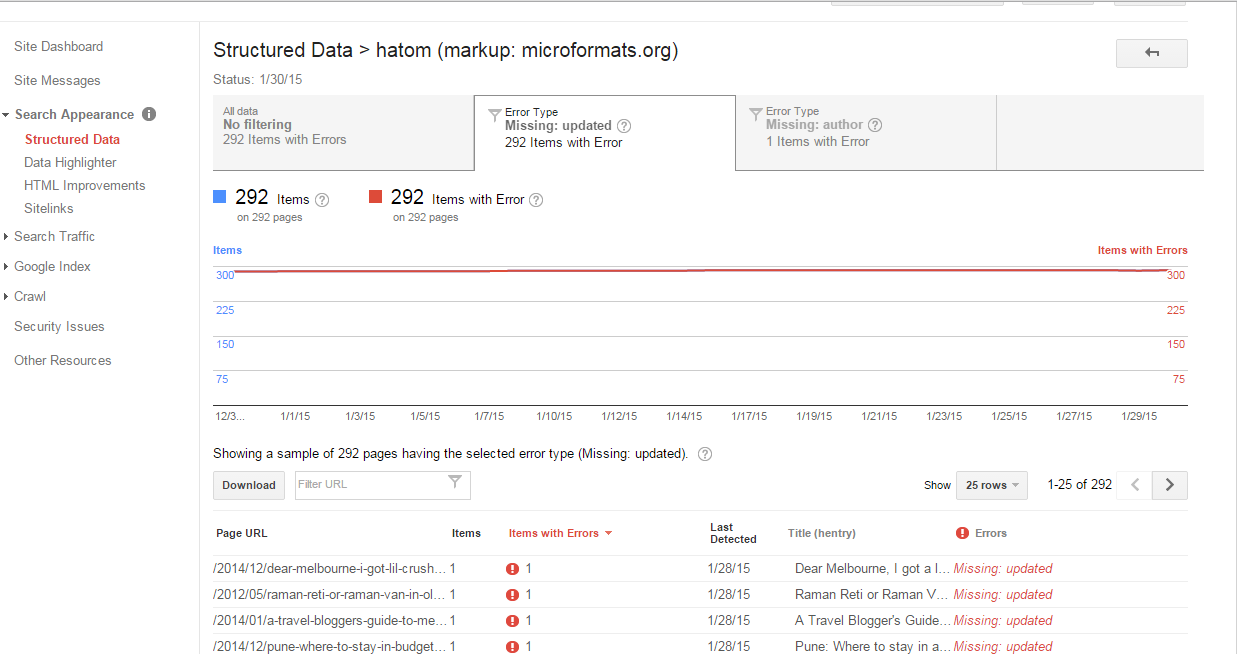
Web%2BError.png

On clicking the top most Page Url with the error, the following image came in view:
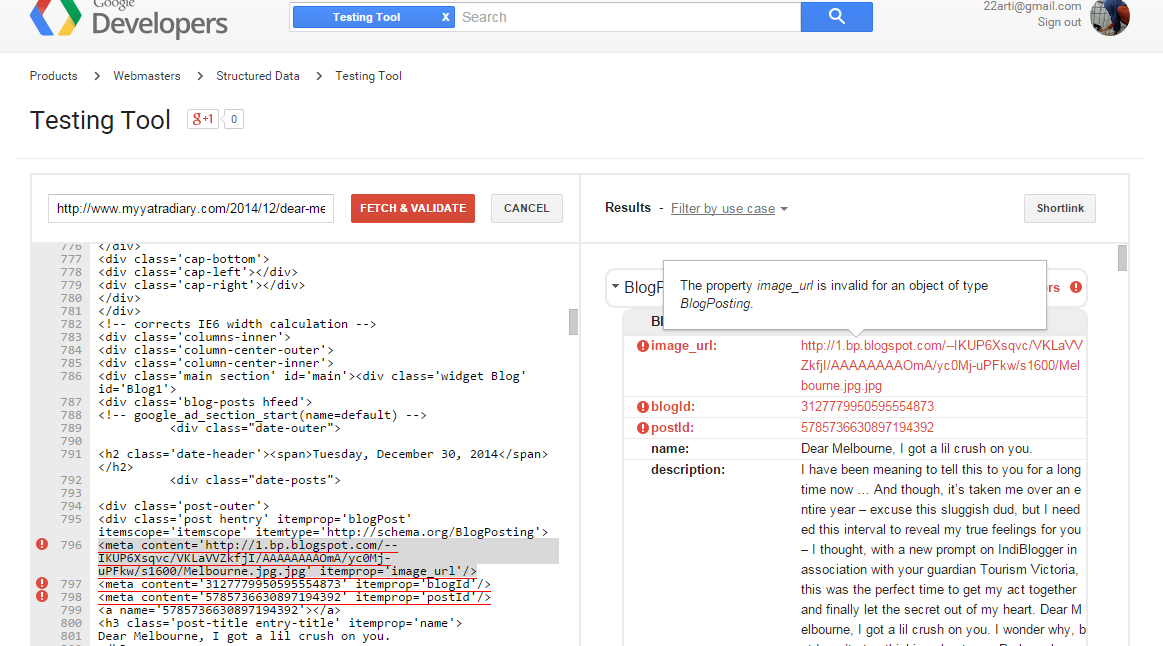
ID%2Berrors.png

If anyone knows anything about these errors and how to solve them, please let me know and I would be highly grateful for your time and assistance. Smile 

Replies 1 to 3 of 3

Vijay Prabhu
from Mumbai |

Arti delete all the earlier marked up data and start a fresh data highlighter for structured data. Its done by trial and error method 

Ranjith
from hyderabad |

Trial and error? Surprised Bad! Tongue out

Ranjith
from hyderabad |

ok. I understood what you meant. You were talking about structured data highlighter? Explored it for the first time today! Laughing

Vijay Prabhu
from Mumbai |

lol Frown aise kaise tum blogging blog likhoge Innocent

Arti
from Mumbai |

I am sorry, Vijay but I did not get you... can you please elaborate a bit how to go about removing these 292 errors. 

Vijay Prabhu
from Mumbai |

I do not see a delete button in my WMT but then I have no errors.  Ranjith pls check this out.  How to delete the error mark ups?

Ranjith
from hyderabad |

Vijay Which site? combo or tech worm?

combo has errors

http://www.google.com/webmasters/tools/richsnippets?q=http%3A%2F%2Fwww.comboupdates.com%2F2015%2F02%2Fwhatsapp-voice-calling-feature-arrives.html

hatom-entry 

Error: Missing required field "entry-title".
Error: Missing required field "updated".
Ranjith
from hyderabad |

Tech worm has no errors

http://www.google.com/webmasters/tools/richsnippets?q=http%3A%2F%2Fwww.techworm.net%2F2015%2F02%2Fsyrian-electronic-army-leaks-classified-data-saudi-arabia-turkey.html

except one

Publisher
This is not a verified publisher markup.
Ranjith
from hyderabad |

Short answer: It can be fixed but not really required. Even my blog shows many errors. Money mouth

http://prntscr.com/62mgur

Also, as far as I know, fixing those errors won't give you any extra seo advantage. 

Arti
from Mumbai |

478 Errors Surprised 

Are you sure they are unimportant? In any case there must be a way to resolve them? Innocent

Ranjith
from hyderabad |

As far as I know, fixing them is not necessary.

https://support.google.com/webmasters/answer/1211158?hl=en&ref_topic=4600154

Will using schema.org improve my site’s performance in search?

Google doesn’t use markup for ranking purposes at this time—but rich snippets can make your web pages appear more prominently in search results, so you may see an increase in traffic.

Blogger templates by default have incorrect schema markup. 

To fix the errors regarding image, blogid and postid, you need to remove the code producing 796-798 (in the second screenshot) from your blog's template.

http://prntscr.com/630aj3

I doubt if you can fix the error about the missing 'updated' value. I can't find a tag that gives the last updated value.

https://support.google.com/blogger/answer/47270?hl=en#posts

Someone is Special
from Bangalore |

Missing:updated errors should be fixed because Google must know the publish date.

Template -> Edit Template:

Search for this code: <data:post.timestamp/>

Search for this code: You will find it twice - one for mobile and one for desktop.

Replace both with the following line of code.

<span class='updated'><data:post.timestamp/></span>

Duplicate Meta Data errors should be fixed because Google will match the keywords with the search for optimized result.

Template -> Edit Template:

Search for this code:

<b:if cond='data:blog.metaDescription != &quot;&quot;'><meta expr:content='data:blog.metaDescription' name='description'/></b:if>

Replace it with the following code:

<b:if cond='data:blog.url != data:blog.homepageUrl'><b:if cond='data:blog.pageType != &quot;item&quot;'><b:if cond='data:blog.metaDescription != &quot;&quot;'><meta expr:content='data:blog.metaDescription' name='description'/></b:if></b:if></b:if>

Save your template and you are done!

One more way to fix duplicate meta description is to set your "Search Description" in each blog post.

Hope this should help you.